RK Cosmos Account Verification: ID Upload for Faster Withdrawals
RK Cosmos Account Verification: ID Upload for Faster Withdrawals
Players who want to withdraw winnings from RK Cosmos to GCash, Maya, or their bank account will need to complete account verification first. This guide walks through the ID and document requirements, how to submit them, and what happens after upload.
21+ only. Please gamble responsibly and only bet what you can afford to lose.
Why RK Cosmos Requires ID Verification Before Processing Withdrawals
RK Cosmos asks players to verify their identity before approving cashouts for several reasons:
- Age confirmation: The platform is restricted to players 21 years old and above. ID verification confirms the account holder meets this requirement.
- Account security: Linking a verified identity to the account prevents unauthorized withdrawals if login credentials are compromised.
- Payment matching: Withdrawals to GCash, Maya, InstaPay, or PESONet must go to accounts that match the name on the casino account. Verification ensures funds reach the correct person.
- Regulatory compliance: Online gaming platforms are expected to know their customers and maintain transaction records.
Most players will be asked to verify when they request their first withdrawal. Some accounts may be flagged for verification earlier, especially if deposit patterns or betting activity trigger internal checks.
Until verification is complete, withdrawal requests typically remain pending. The sooner documents are submitted and approved, the sooner cashouts can be processed.
Accepted Documents: Valid IDs, Proof of Address, Selfie with ID
RK Cosmos generally requires three types of documents to verify an account:
Valid Government-Issued Photo ID
One clear photo of a current, government-issued ID that shows the player's full name, date of birth, and photo. Accepted IDs include:
- Philippine Passport
- Driver's License
- UMID (Unified Multi-Purpose ID)
- National ID (PhilSys ID)
- SSS ID
- Postal ID
- Voter's ID
- PRC ID (Professional Regulation Commission)
The ID must not be expired. All four corners should be visible in the photo, and text should be legible. Blurry images, partial scans, or screenshots of photos are often rejected.
Proof of Address
A recent document that shows the player's full name and current residential address. The document should be dated within the last three months. Examples include:
- Utility bill (electric, water, internet, cable)
- Bank statement
- Credit card statement
- Government-issued document with address
- Barangay certificate or clearance
If the player lives with family and bills are not in their name, a barangay certificate or other official document listing the player's name and address may be accepted. Screenshots are usually not sufficient—upload a photo or PDF of the original document.
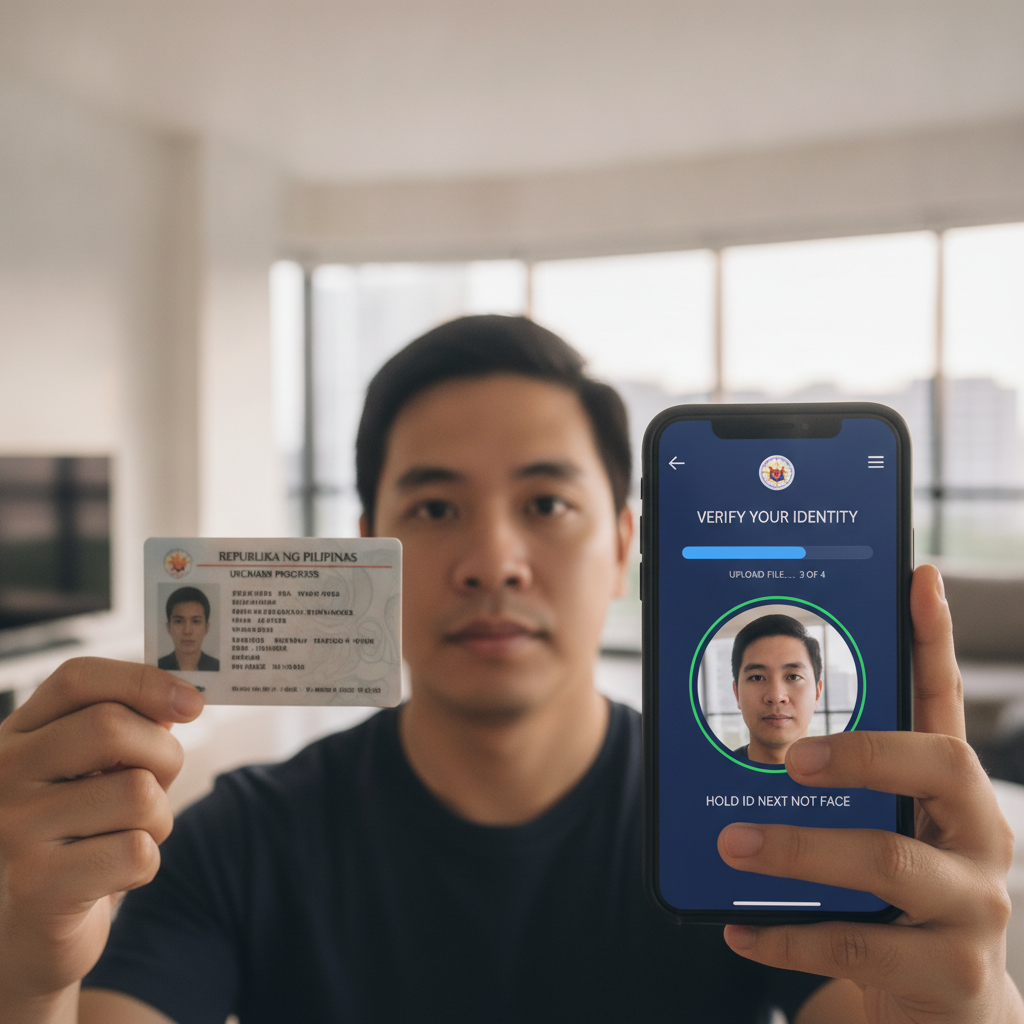
Selfie Holding ID
A photo of the player holding the same government ID next to their face. The ID should be clearly visible, and the player's face should match the photo on the ID. Both the face and the ID text must be in focus.
This step confirms that the person who created the account is the same person shown on the submitted ID.
Additional Documents (if requested)
In some cases, RK Cosmos may ask for extra documentation:
- Payment method verification: A screenshot of the GCash or Maya account screen showing the account name, or a bank statement showing the InstaPay/PESONet account details.
- Source of funds: For large deposits or withdrawals, the platform may request payslips, business documents, or other income verification.
Players will be notified by email or in-app message if additional documents are needed.
Step-by-Step Photo Upload and Submission Through the App or Site
RK Cosmos offers document upload through both the mobile app and the website. The process is similar on both platforms.
Using the RK Cosmos Android App
- Log in to the RK Cosmos app using your registered mobile number or email and password.
- Tap the profile or account icon, usually found in the top corner of the home screen.
- Select "Verification" or "Account Verification" from the menu. This may also appear as "KYC" or "Submit Documents."
- Choose the document type you want to upload: Government ID, Proof of Address, or Selfie with ID.
- Tap "Upload" or the camera icon. You can take a new photo with your phone camera or select an existing image from your gallery.
- Review the photo to make sure all text is clear, the entire document is visible, and there is no glare or shadow obscuring information.
- Submit the document. Repeat for each required document type.
- Check for confirmation. A message or notification should confirm that the documents have been received and are under review.
Using the RK Cosmos Website
- Log in to your account at the RK Cosmos website on your mobile browser or desktop.
- Click on your profile or account settings, usually accessible from the top menu or sidebar.
- Navigate to "Verification," "KYC," or "Submit Documents."
- Select the document category (ID, proof of address, or selfie).
- Click "Choose File" or "Upload" and select the image file from your phone or computer. Accepted formats are typically JPG, PNG, or PDF.
- Preview the upload to ensure clarity and completeness.
- Submit each document. Repeat for all required items.
- Wait for confirmation via email or in-app notification.
Tips for Clear Document Photos
- Good lighting: Take photos in a well-lit area. Avoid shadows, glare from overhead lights, or reflections if the ID is laminated.
- Flat surface: Place the document on a flat, contrasting background (such as a dark table for a light-colored ID).
- All corners visible: Capture the entire document, including all four edges.
- Readable text: Zoom in slightly if needed, but keep the image in focus. Blurry or pixelated text will result in rejection.
- No editing: Do not crop out parts of the document, apply filters, or digitally alter the image. Submit the original photo.
How Long Verification Takes and What to Do if Documents Are Rejected
Standard Processing Time
RK Cosmos typically reviews verification documents within 24 to 72 hours on business days. During weekends, holidays, or periods of high volume (such as after a major PBA game or jackpot win), processing may take longer.
Players can check the status of their verification by:
- Logging into the app or website and visiting the Verification section
- Checking email for updates from RK Cosmos support
- Contacting customer support via live chat or the in-app help center
Once documents are approved, the account status will change to "Verified," and pending withdrawals can proceed. If documents are rejected, the player will receive a message explaining the reason.
Common Reasons for Rejection
- Blurry or unreadable image: Text, photo, or security features are not clear.
- Expired ID: The document is no longer valid.
- Partial document: Edges, corners, or portions of the ID are cut off.
- Name mismatch: The name on the document does not match the name registered on the RK Cosmos account.
- Document too old: Proof of address is dated more than three months ago.
- Selfie issues: Face is obscured, ID is not visible, or the photo does not match the ID.
- Wrong file format or size: File type is not supported, or the image file is too large or too small.
What to Do if Documents Are Rejected
If verification documents are rejected, follow these steps:
- Read the rejection message carefully. RK Cosmos usually provides a reason—such as "ID not clear" or "Proof of address expired."
- Retake or rescan the document following the tips above: good lighting, flat surface, all corners visible, and high resolution.
- Double-check that names match across your RK Cosmos account, ID, and payment methods (GCash, Maya, or bank account).
- Resubmit through the same upload process in the app or website.
- Contact customer support if you are unsure why a document was rejected or if you have submitted multiple times without success. Live chat and email support can provide specific guidance.
Some players encounter issues if their registered account name uses a nickname or shortened version of their legal name. In that case, contact support to update the account name to match official documents before resubmitting.
21+ Only, Gamble Responsibly
RK Cosmos is available only to players aged 21 and above. Account verification helps ensure this age requirement is met.
Responsible gambling reminder: Betting and casino gaming should be entertainment, not a way to make money or solve financial problems. Set a budget for deposits, take breaks, and seek help if gambling feels out of control. RK Cosmos offers self-exclusion and limit-setting tools in account settings.
Summary: RK Cosmos requires ID verification before processing withdrawals to GCash, Maya, InstaPay, or PESONet. Players need to submit a valid government-issued photo ID, proof of address dated within three months, and a selfie holding the ID. Documents can be uploaded through the mobile app or website and are usually reviewed within 24 to 72 hours. If rejected, check the reason provided, retake the photo with better lighting and clarity, and resubmit. Completing verification early avoids delays when cashing out winnings.